v2.5.0 workflow engine transition
Starting with v2.5.0, new workflow runs use Appsmith's native workflow engine. Runs that started before v2.5.0 continue on Temporal, and every v2.5.x release keeps Temporal running so those runs can complete. Complete this checkpoint on a v2.5.x release before you upgrade to v2.6. If previous-engine approval runs are still open, v2.6 stops during startup.
Set APPSMITH_TEMPORAL_URL to disabled to turn Temporal off. When that variable is unset, v2.6 starts Temporal. See Environment variables.
This page applies only to self-hosted instances. Appsmith Cloud does not use upgrade checkpoints.
Complete the checkpoint
- Sign in as an instance administrator.
- Go to Admin Settings > Instance > Admin central.
- Find the v2.5.0 · Workflow Engine Transition checkpoint.
For an overview of how checkpoints work, click How checkpoints work on the same screen, or see Upgrade checkpoints.
While any Temporal runs are still in progress, Admin central shows the upgrade as blocked. For each workflow, it lists the workspace, the number of runs in progress, and the age of the oldest run.
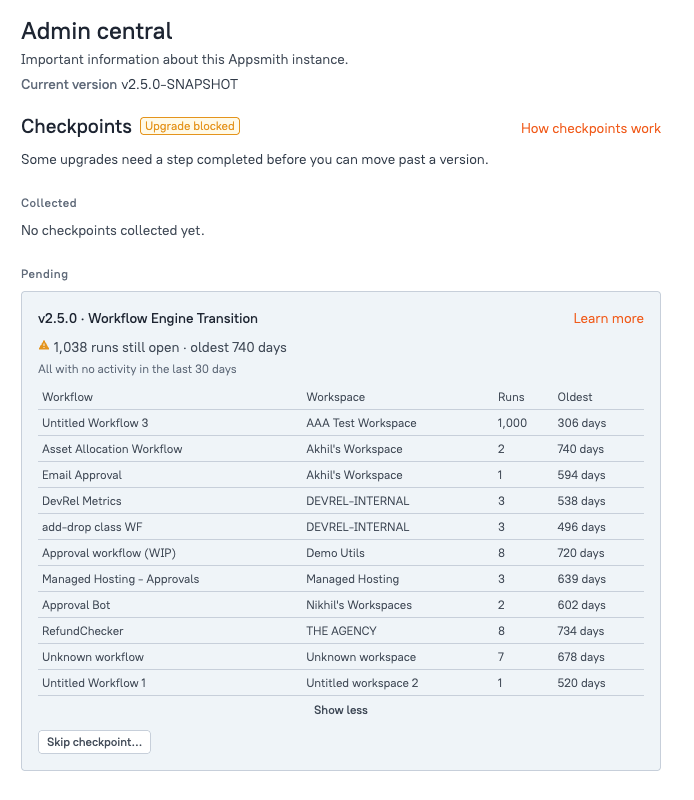
Where possible, let in-progress runs complete. Stop a run only if you no longer need it to finish.
Acknowledge the checkpoint
When no runs remain in progress, Skip checkpoint... changes to Acknowledge. Click Acknowledge to mark the checkpoint complete.
Skip the checkpoint
If runs are still in progress and you need to upgrade anyway, click Skip checkpoint... and review the confirmation dialog before you continue.
Skipping records that you chose to upgrade while runs were still in progress. Appsmith won't prompt you about this checkpoint again.
After you complete the checkpoint
Admin central moves the checkpoint to Collected. The entry shows the version, the name Workflow Engine Transition, the outcome Marked complete, and who completed it and when.
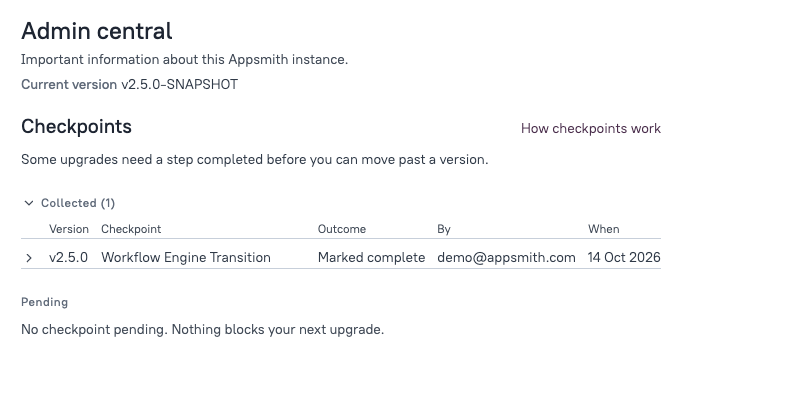
Under Pending, Admin central displays No checkpoint pending. Nothing blocks your next upgrade. You can now upgrade to v2.6.
If the server does not start
If you upgraded to v2.6 or later before completing this checkpoint, Appsmith stops the backend during startup, so Admin central isn't available.
To recover, follow Upgrade checkpoints. Roll back to the v2.5.x version named in the server log, complete or skip this checkpoint in Admin central, and then upgrade again.