DatePicker (ALPHA)
Responsive Widgets are in alpha and available by invitation only on Business and Enterprise plans. Behavior and properties may change. To request access, open a support ticket and name the feature Responsive Widgets (ALPHA).
The DatePicker widget lets users pick a date from a calendar or type it in. You can also let users pick a time, down to the second. Use it for dates such as a due date, a booking date, or a date of birth. To pick a start and end date, use the DateRangePicker widget.
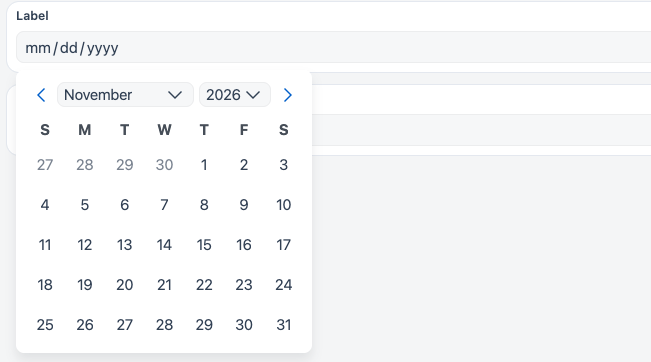
Widget type: WDS_DATEPICKER_WIDGET
Content properties
These properties appear in the Content tab of the property pane.
Type
Data type string
Sets the kind of input. Choosing another type changes the widget into the matching input widget. You cannot bind this property. Options: Single-line text, Multi-line text, Number, Password, Email, Phone number, Currency, Date. Default: Date.
Data
Date format string
Sets the format of formattedDate. Pick a format from the list, or switch to JS to enter a moment.js format string. Default: YYYY-MM-DD HH:mm.
The list offers these formats: ISO 8601 (YYYY-MM-DDTHH:mm:ss.sssZ), LLL, LL, YYYY-MM-DD HH:mm, YYYY-MM-DDTHH:mm:ss, YYYY-MM-DD hh:mm:ss A, DD/MM/YYYY HH:mm, D MMMM, YYYY, H:mm A D MMMM, YYYY, YYYY-MM-DD, MM-DD-YYYY, DD-MM-YYYY, MM/DD/YYYY, DD/MM/YYYY, DD/MM/YY, and MM/DD/YY.
Default Date string
Sets the date shown when the widget loads. Pick a date, or switch to JS to bind an ISO date string. If you change this value, the widget's date updates to match. Default: empty.
Example:
{{moment().format("YYYY-MM-DD")}}
Time Precision string
Sets how precise the time is, or hides the time picker. Options:
- Day: date only, no time picker.
- Hour
- Minute
- Second
Default: Day.
First day of week string
Sets the first day of the week in the calendar. Options: Sunday to Saturday. When you bind it, use one of sun, mon, tue, wed, thu, fri, or sat. Default: Sunday.
Label
Text string
Sets the label shown above the date input. Default: Label.
Validations
Required boolean
Makes picking a date mandatory. When on and no date is set, the widget is invalid and shows the message "Please select a valid date" after the user interacts with it. Default: off.
Minimum Date string
Sets the earliest date users can pick. A selected date outside the allowed range makes the widget invalid.
Maximum Date string
Sets the latest date users can pick. A selected date outside the allowed range makes the widget invalid.
General
Tooltip string
Shows help text or details next to the label.
Visible boolean
Controls whether the widget is visible when the app runs. Default: on.
Disabled boolean
Stops users from changing the date. Default: off.
Animate loading boolean
Shows a loading animation while the widget's data loads. Default: on.
Reference properties
Reference properties let you read the widget's state in bindings and code, for example {{DatePicker1.isVisible}}. You cannot set them directly.
isVisible boolean
Shows whether the widget is visible.
Example:
{{DatePicker1.isVisible}}
selectedDate string
Holds the selected date as an ISO 8601 string. It is an empty string when no date is set.
Example:
{{DatePicker1.selectedDate}}
formattedDate string
Holds the selected date in the format set in Date format. It is an empty string when no date is set.
Example:
{{DatePicker1.formattedDate}}
isDisabled boolean
Shows whether the widget is disabled.
Example:
{{DatePicker1.isDisabled}}
Methods
Methods let you change the widget's properties from code, for example in a JS Object.
setVisibility (param: boolean): Promise
Shows or hides the widget.
Example:
DatePicker1.setVisibility(true)
setDisabled (param: boolean): Promise
Turns the disabled state on or off.
Example:
DatePicker1.setDisabled(false)
Events
onDateSelected
Runs when the user selects or changes the date.
onFocus
Runs when the date input gets focus.
onBlur
Runs when the date input loses focus.