Code (ALPHA)
Responsive Widgets are in alpha and available by invitation only on Business and Enterprise plans. Behavior and properties may change. To request access, open a support ticket and name the feature Responsive Widgets (ALPHA).
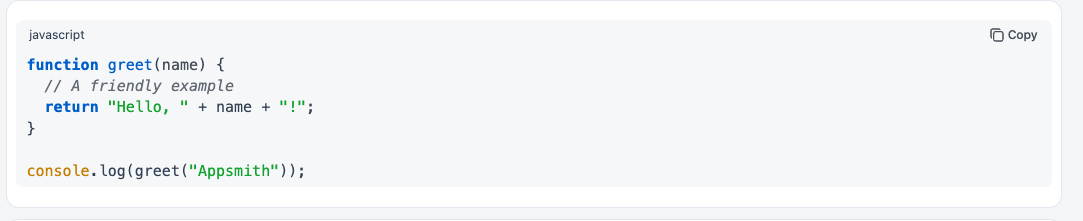
The Code widget shows a code snippet with syntax highlighting. Users can read and copy the code, but they cannot edit it. Use it to show a query, a JSON response, a config file, or a sample script. The colors follow the app theme, in both light and dark mode.
Widget type: WDS_CODE_WIDGET
Content properties
These properties appear in the Content tab of the property pane.
Data
Code string
Sets the code to show. The widget always shows the code as text, never as HTML. Line breaks and special characters are kept. You can bind data to it, for example {{JSON.stringify(Api1.data, null, 2)}}.
Language string
Sets the language used for syntax highlighting. Default: JavaScript.
Options: JavaScript, TypeScript, Python, Java, JSON, SQL, HTML, CSS, Bash, YAML, Markdown, XML, Go, Rust, Plain text.
Values for code: javascript, typescript, python, java, json, sql, html, css, bash, yaml, markdown, xml, go, rust, plaintext.
If you bind a value that is not in this list, the widget shows the code as plain text.
General
Show line numbers boolean
Shows line numbers next to the code. Default: off.
Show copy button boolean
Shows a header with the language name and a Copy button. The button copies the raw code to the clipboard. Default: on.
Wrap long lines boolean
Wraps long lines onto the next line. When off, users scroll sideways to see long lines. Default: off.
Visible boolean
Controls whether the widget is visible. Default: on.
Animate loading boolean
Controls the loading animation of the widget. Default: on.
Reference properties
Reference properties let you read the widget's state in bindings and code, for example {{Code1.isVisible}}. You cannot set them directly.
code string
The code the widget shows.
Example:
{{Code1.code}}
language string
The language set for syntax highlighting.
Example:
{{Code1.language}}
value string
The same value as code.
Example:
{{Code1.value}}
isVisible boolean
Shows whether the widget is visible.
Example:
{{Code1.isVisible}}
Methods
Methods let you change the widget's properties from code, for example in a JS Object.
setVisibility (param: boolean): Promise
Shows or hides the widget.
Example:
Code1.setVisibility(false)
setCode (param: string): Promise
Sets the code the widget shows.
Example:
Code1.setCode("SELECT * FROM users LIMIT 10;")