Markdown (ALPHA)
Responsive Widgets are in alpha and available by invitation only on Business and Enterprise plans. Behavior and properties may change. To request access, open a support ticket and name the feature Responsive Widgets (ALPHA).
The Markdown widget shows formatted text from a Markdown string. Use it for help content, release notes, or text that comes from a query or an AI response. For plain text, use the Paragraph widget.
Widget type: WDS_MARKDOWN_WIDGET
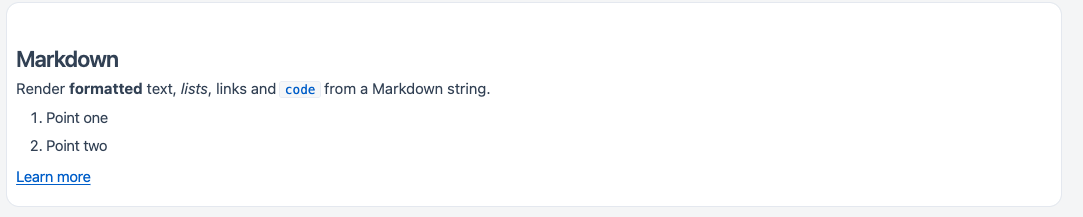
Supported Markdown
The widget supports standard Markdown and GitHub Flavored Markdown (GFM). For example:
- Headings, bold, italic, and inline code
- Bulleted and numbered lists
- Links
- Tables
- Fenced code blocks
How some elements render:
- Links open in a new browser tab.
- Fenced code blocks that name a language after the opening backticks, for example
sqlorjs, show syntax highlighting, the language name, and a Copy button. Code blocks without a language show as plain code.
HTML is not rendered
The widget never turns HTML inside the Markdown into live page elements. Any HTML tags in the text, such as <script>, <img>, or <iframe>, show as plain text or are left out. They do not run.
Markdown syntax itself still works. If you bind the widget to data you do not control, such as user input or an API response, Markdown images in that data load from their external URLs, and Markdown links can point to any web address.
Content properties
These properties appear in the Content tab of the property pane.
General
Text string
Sets the Markdown content. Line breaks are kept, because Markdown needs them. You can bind data to it, for example {{Api1.data.notes}}.
Example:
## Release notes

- **Fixed** the login error
- Added [docs](https://docs.appsmith.com)
Visible boolean
Controls whether the widget is visible. Default: on.
Animate loading boolean
Controls the loading animation of the widget. Default: on.
Reference properties
Reference properties let you read the widget's state in bindings and code, for example {{Markdown1.isVisible}}. You cannot set them directly.
text string
The Markdown string the widget shows.
Example:
{{Markdown1.text}}
value string
The same value as text.
Example:
{{Markdown1.value}}
isVisible boolean
Shows whether the widget is visible.
Example:
{{Markdown1.isVisible}}
Methods
Methods let you change the widget's properties from code, for example in a JS Object.
setVisibility (param: boolean): Promise
Shows or hides the widget.
Example:
Markdown1.setVisibility(false)
setText (param: string): Promise
Sets the Markdown string the widget shows.
Example:
Markdown1.setText("## Done\n\nYour report is **ready**.")