Map Chart (ALPHA)
Responsive Widgets are in alpha and available by invitation only on Business and Enterprise plans. Behavior and properties may change. To request access, open a support ticket and name the feature Responsive Widgets (ALPHA).
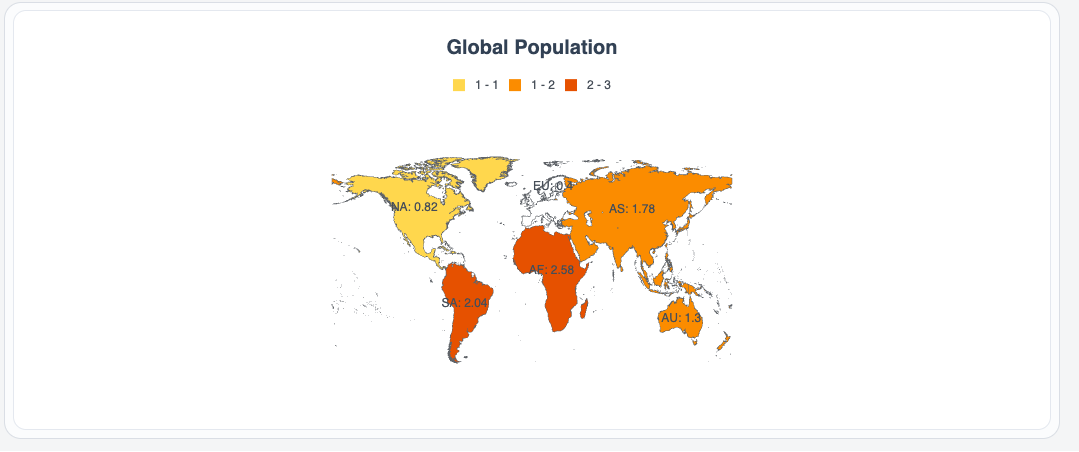
The Map Chart widget shows a map of the world, a continent, or the USA. It colors each region based on its value. Use it to compare data by country or state, such as population or sales. Users can click a region to run an action.
Widget type: WDS_MAP_CHART_WIDGET
Content properties
These properties appear in the Content tab of the property pane.
Data
Map type string
Sets which map the widget shows. When you change it in the property pane, Region data changes to a sample data set for that map. Options:
- World (default):
WORLD - World with Antarctica:
WORLD_WITH_ANTARCTICA - Europe:
EUROPE - North America:
NORTH_AMERICA - South America:
SOURTH_AMERICA - Asia:
ASIA - Oceania:
OCEANIA - Africa:
AFRICA - USA:
USA
Region data array
Sets the value of each region. Each item is an object with an id that matches a region on the map and a value. Both keys are required, and each id must be unique.
Example:
{{[
  { id: "NA", value: 515 },
  { id: "EU", value: 743 }
]}}
General
Title string
Sets the map title. New widgets start with Global Population.
Height (px) number
Sets the height of the map in pixels. A map has no natural height, so set it to fit your layout. The minimum is 120. Default: 400.
Show labels boolean
Shows the region labels on the map. Default: on.
Visible boolean
Controls whether the widget is visible. Default: on.
Animate loading boolean
Controls the loading animation of the widget. Default: on.
Color range
Color range array
Sets value ranges and the color that regions in each range take. Each item is an object with these keys:
minValue(required): the low end of the range.maxValue(required): the high end of the range.code: a 6-digit hex color, for example#FF04D7.displayValue(optional): a text label for the range.alpha(optional): the opacity, from 0 to 100.
Example:
{{[
  { minValue: 0.5, maxValue: 1.0, code: "#FFD74D" },
  { minValue: 1.0, maxValue: 2.0, code: "#FB8C00" },
  { minValue: 2.0, maxValue: 3.0, code: "#E65100" }
]}}
Events
onDataPointClick
Sets the action that runs when a user clicks a region. See Events.
Reference properties
Reference properties let you read the widget's state in bindings and code, for example {{MapChart1.isVisible}}. You cannot set them directly.
isVisible boolean
Shows whether the widget is visible.
Example:
{{MapChart1.isVisible}}
mapType string
Holds the map type, for example WORLD.
Example:
{{MapChart1.mapType}}
showLabels boolean
Shows whether region labels are on.
Example:
{{MapChart1.showLabels}}
selectedDataPoint object
Holds the last region the user clicked, as { id, label, shortLabel, originalId, value }.
Example:
{{MapChart1.selectedDataPoint.label}}
Methods
Methods let you change the widget's properties from code, for example in a JS Object.
setVisibility (param: boolean): Promise
Shows or hides the widget.
Example:
MapChart1.setVisibility(false)
setData (param: array): Promise
Sets the region data.
Example:
MapChart1.setData([{ id: "NA", value: 515 }])
Events
onDataPointClick
Runs when a user clicks a region. Read the clicked region in {{MapChart1.selectedDataPoint}}.