Modal (ALPHA)
Responsive Widgets are in alpha and available by invitation only on Business and Enterprise plans. Behavior and properties may change. To request access, open a support ticket and name the feature Responsive Widgets (ALPHA).
A Modal is a dialog that opens on top of the page. It has a header with a title, a body that holds your widgets, and a footer with Submit and Cancel buttons. Use it for focused tasks, such as editing a record or confirming an action.
Widget type: WDS_MODAL_WIDGET
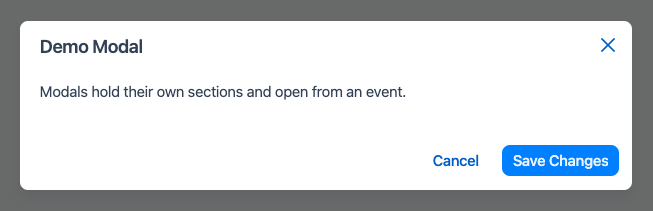
Open and close the Modal
The Modal is hidden when the app loads. It does not take up space on the page.
- To open it, call
showModal()with the Modal's name, for example from a button's onClick event:{{showModal(Modal1.name)}}. - To close it from code, call
closeModal(Modal1.name). - Users can close it with the Cancel button. They can also close it by clicking outside it or pressing Escape, when those options are on.
In the editor, the Modal opens when you select it, so you can add widgets to it.
Widgets you drop into the Modal body stack from top to bottom.
Content properties
These properties appear in the Content tab of the property pane.
General
Animate loading boolean
Shows a loading animation while the Modal loads. On by default.
Size string
Sets the size of the Modal. Options:
- Small
- Medium (default)
- Large
Header
Header boolean
Shows or hides the header. On by default.
Title string
The title shown in the header. Default: Modal Title.
This property shows only when Header is on.
Footer
Footer boolean
Shows or hides the footer with the Submit and Cancel buttons. On by default.
Submit boolean
Shows or hides the Submit button. On by default.
This property shows only when Footer is on.
Submit Button Text string
The label of the Submit button. Default: Save Changes. If you leave it empty, the button shows Submit.
This property shows only when Footer and Submit are on.
Cancel Button Text string
The label of the Cancel button. Default: Cancel. If you leave it empty, the button shows Cancel.
This property shows only when Footer is on.
Behavior
Quick dismiss boolean
Closes the Modal when the user clicks the backdrop outside it. On by default.
Close on escape boolean
Closes the Modal when the user presses the Escape key. On by default.
Reference properties
Reference properties let you read the widget's state in bindings and code, for example {{Modal1.isVisible}}. You cannot set them directly.
name string
The name of the Modal. Pass it to showModal() and closeModal().
Example:
{{Modal1.name}}
isVisible boolean
Shows whether the Modal is open. It is false when the app loads.
Example:
{{Modal1.isVisible}}
Events
onClose
Runs when the Modal closes. This includes closing with the Cancel button, the backdrop, or the Escape key.
onSubmit
Runs when the user clicks the Submit button.
This event shows only when Footer and Submit are on.
Close on submit boolean
This setting appears in the Events section. When it is on, the Modal closes as soon as the user clicks Submit. On by default.
If onSubmit runs a query, consider turning this off. Then close the Modal with closeModal() in the query's success or failure callback.
This setting shows only when Footer and Submit are on.